Sell My Phone in Pflugerville: Carrier Locked, Paid Off or Blacklisted?
Selling your phone in Pflugerville? Here's what carrier locked, paid off and blacklisted mean, and how to check each one before you sell.
Thinking about selling your old phone before the holidays? If you searched sell my phone Pflugerville, three questions come up fast: is it carrier locked, is it paid off, and has it ever been reported lost or stolen? Here's what each one means in plain words, how to check it yourself in a few minutes, and why any buyer cares.
The short answer
A buyer wants a phone that's unlocked, fully paid for, not on a lost or stolen list, and signed out of your accounts. You can check all four from your couch. If one of them isn't sorted yet, it's still good to know before you list the phone or reach out to a buyer.
What carrier locked means
A carrier locked phone is set up to work only with the carrier it came from. Pop in a SIM from another carrier and it won't connect. Unlocking removes that limit so the phone can work on other networks, which makes it useful to a lot more people.
Apple says only your current carrier can unlock an iPhone, and the request can take a few days to go through. Each carrier has its own unlock rules, so ask yours what they need from you.
How to check on an iPhone
Go to Settings > General > About and look next to Carrier Lock. If it says No SIM restrictions, the iPhone is unlocked. Apple walks through it here: How to unlock your iPhone for use with a different carrier.
On Android phones the menus change by brand and carrier, so the simplest move is to ask your carrier whether the phone is unlocked.
What paid off means
Lots of phones are bought on a monthly payment plan through the carrier. Until that plan is paid in full, there's still a balance tied to the phone. Carriers often connect unlocking to the phone being paid off, so these two questions usually travel together.
Look for a device balance on your carrier account or bill. Not sure? Call your carrier and ask two things: is this phone paid off, and can it be unlocked?
What blacklisted means
A blacklisted phone is one that's been reported lost or stolen. Those reports get shared, and a phone on the list can be blocked from connecting. That's why careful buyers check before they pay.
How to check the IMEI
Every phone with cell service has an IMEI, a 15-digit number. Dial *#06# on the keypad to see it, or find it in the phone's settings. Then enter it on CTIA's Stolen Phone Checker, a public tool from CTIA, the group that represents the US wireless industry. A green result means the phone wasn't flagged at the moment you checked. Wi-Fi only tablets don't have an IMEI, so they can't be checked this way.
Don't forget: signed out and SIM out
The fourth check is the one people miss. If a phone is still signed in to iCloud with Find My on, or still has your Google account on it, the next person can't set it up. Back up your photos and files first, then sign out of iCloud and Find My, or remove your Google account. Take out the SIM and any memory card too.
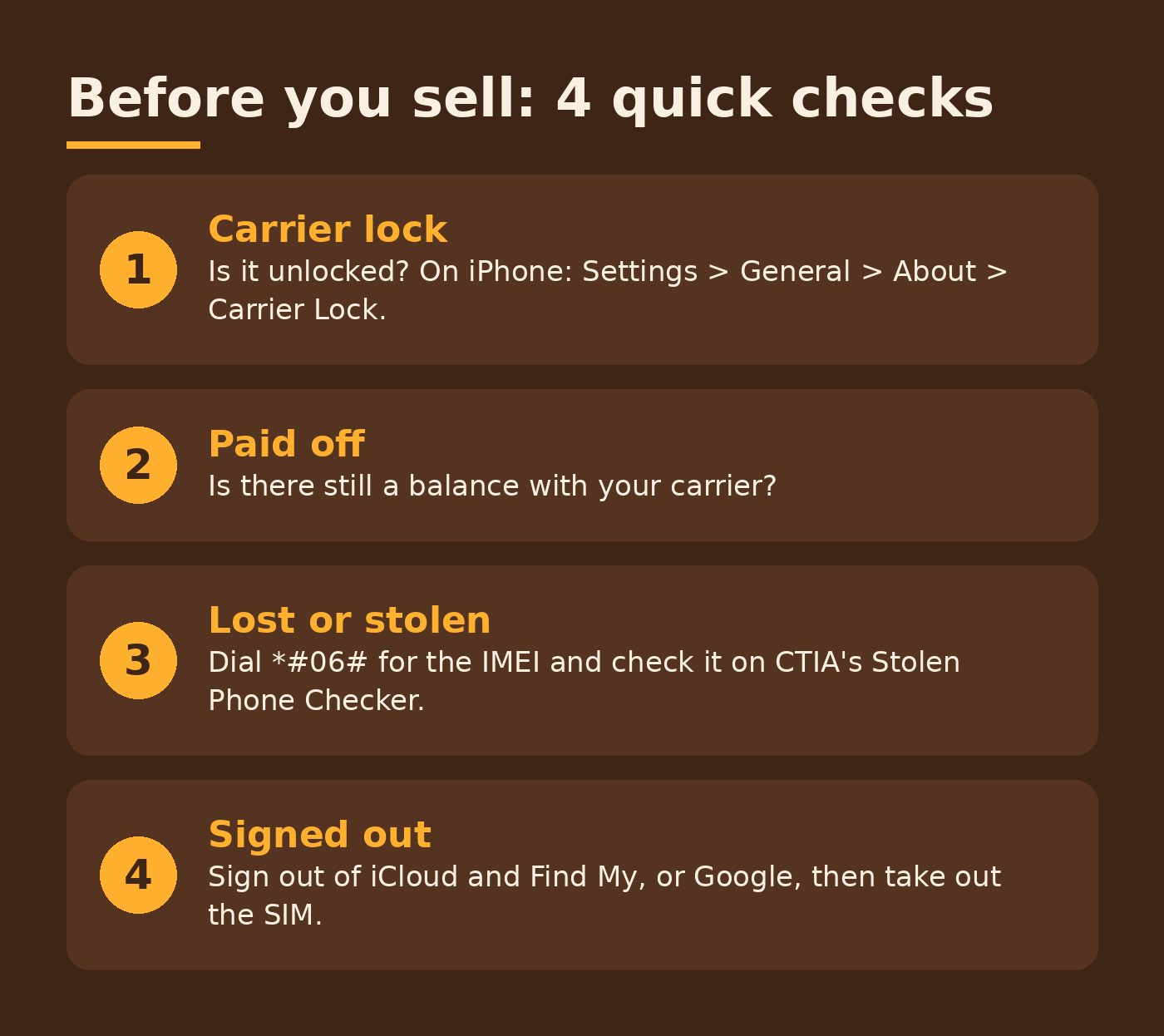
Before you sell: 4 quick checks
- Carrier lock: Is it unlocked? On iPhone: Settings > General > About > Carrier Lock.
- Paid off: Is there still a balance with your carrier?
- Lost or stolen: Dial *#06# for the IMEI and check it on CTIA's Stolen Phone Checker.
- Signed out: Sign out of iCloud and Find My, or Google, then take out the SIM.
Selling your phone to us in Pflugerville
We're a family owned mobile repair service, and we also buy used phones, tablets, laptops and consoles around the Austin metro, from Pflugerville and Round Rock to Hutto and Manor. We look at every device case by case. When you reach out, we'll ask whether it's paid off, carrier locked, still signed in to an account, or reported lost or stolen, so having those answers ready makes things quicker.
Any price is an estimate until we see the phone in person. Sellers need to be 18 or older with a photo ID, and we meet curbside only, at your home, your office or a public spot like a coffee shop.
Got a phone, tablet or console you're done with? Tell us what you've got and we'll get back to you. If it has a cracked screen or a tired battery and you'd rather keep it, you can request a free diagnostic instead.