Trade In or Sell Your Old Phone in Hutto? What to Know Before Black Friday
Upgrading on Black Friday? See how carrier trade-ins, Apple Trade In and selling your old phone in Hutto compare, and how to prep it first.
Black Friday lands on November 27 this year, and a lot of phone upgrade deals lean on a trade-in. So before you grab a new phone, it's worth a minute to decide what happens to the old one. If you want to sell your old phone in Hutto or anywhere around Austin, trade it in, or hand it down, here's a plain look at each option.
The short version: a trade-in is the easy button, but the credit is usually tied to a store, a plan or a payment schedule. Selling gets you money with no strings, but takes a little more effort. Either way, prep the phone the same way first.
Option 1: Carrier trade-in deals
The big carrier deals often pay you back as bill credits spread over 24 or 36 months, not cash up front. That can be a great deal if you're happy staying where you are. The catch is that the credits usually depend on keeping things as they are. Moving to a cheaper plan too early, paying the phone off ahead of schedule or canceling service can stop the credits you haven't gotten yet.
A few questions worth asking before you sign:
- How many months are the credits spread over?
- Does the deal need a certain plan or a new line?
- What happens if I pay the phone off early or switch plans?
- How long do I have to send the old phone in?
Carriers also check what you send. The phone has to be the one listed on the trade-in, it has to be wiped, and an iPhone that's still locked to an iCloud account can be turned down.
Option 2: Apple Trade In
With Apple Trade In, the value goes toward a new device or comes as an Apple Gift Card. What you get depends on the model and its condition. If the phone doesn't match the condition you described, Apple can revise the offer, and you can accept or reject the new number. If your phone isn't eligible for credit, Apple will recycle it for free.
Option 3: Sell your old phone locally
Selling to a person or a local shop gets you money instead of store credit, and it isn't tied to your plan or your next phone. It takes a bit more work: you'll answer some questions about the phone and meet up. And any number you hear online is only an estimate until someone sees the phone in person.
Selling to Damage Control
We buy used phones, tablets, laptops, consoles and drones, and we look at each device case by case. On our sell your phone page you tell us the model, its condition and your asking price. We'll ask whether it's paid off, carrier locked, signed in to an account, or reported lost or stolen. Any price is an estimate until we see it in person.
It's curbside only: if we both agree, a tech meets you outside your home, your office or a public spot like a coffee shop, and never comes inside. Sellers need to be 18 or older with a photo ID. We cover Hutto, Round Rock, Pflugerville, Georgetown and the rest of the Austin area.
Option 4: Keep it in the family
Not every old phone needs to leave the house. If it's going to a kid, a parent or a spare drawer, a tired battery or a cracked screen can be fixed. We start with a free diagnostic and a clear quote before any paid work, and in-stock battery and screen replacements are generally done the same day.
How to prep your old phone before you trade in or sell
Whichever way you go, do these steps first. They protect your data and keep a trade-in or sale from getting held up.
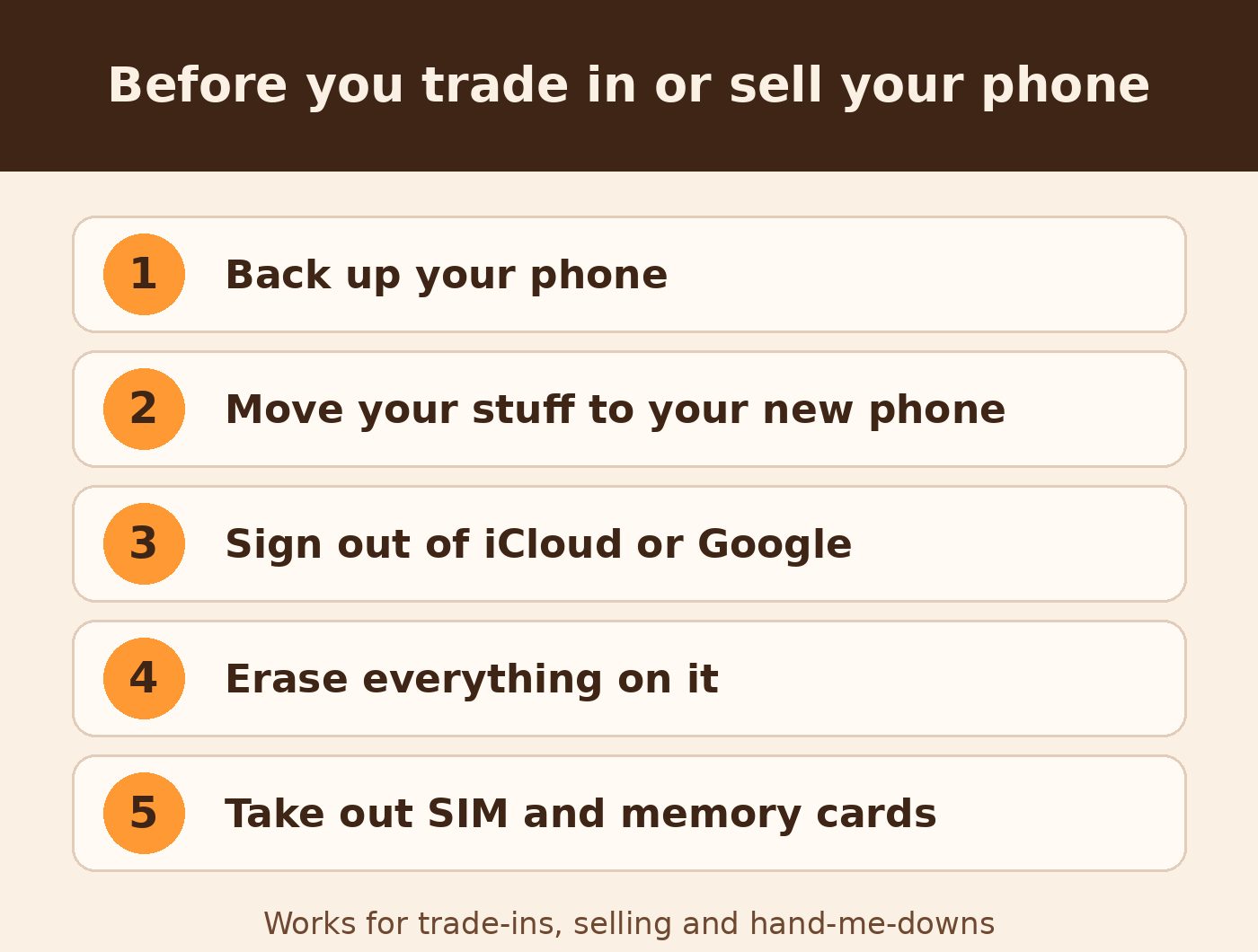
- Back up your phone. Make a fresh backup so nothing gets lost.
- Move your stuff to your new phone. On an iPhone, Quick Start can move it over.
- Sign out of iCloud or Google. On an iPhone, open Settings, tap your name, scroll down and tap Sign Out. If you paired an Apple Watch, unpair it first. On Android, remove your Google account.
- Erase everything on it. On an iPhone, go to Settings > General > Transfer or Reset iPhone > Erase All Content and Settings. If you use an eSIM and you're selling, choose the option that erases the eSIM too.
- Take out SIM and memory cards. And pull off the case while you're at it.
Apple keeps the full steps on its before you sell, give away or trade in page. It's also smart to know whether the phone is paid off and whether it's carrier locked, since both come up with trade-ins and sales.
So which one should you pick?
- Staying with your carrier for a few years? A trade-in deal can make sense. Read how the credits are paid out.
- Want money, or might switch plans? Selling is usually the more flexible choice.
- Phone still has life in it? A quick repair can make it a solid hand-me-down.
Got an old phone, tablet or console sitting around after an upgrade? Tell us what you've got, or call us at (512) 649-5492. If it just needs a fix, request a free diagnostic and we'll pick it up curbside.